
CF7 Skins Multi
Multiple Page Contact Form 7 Forms
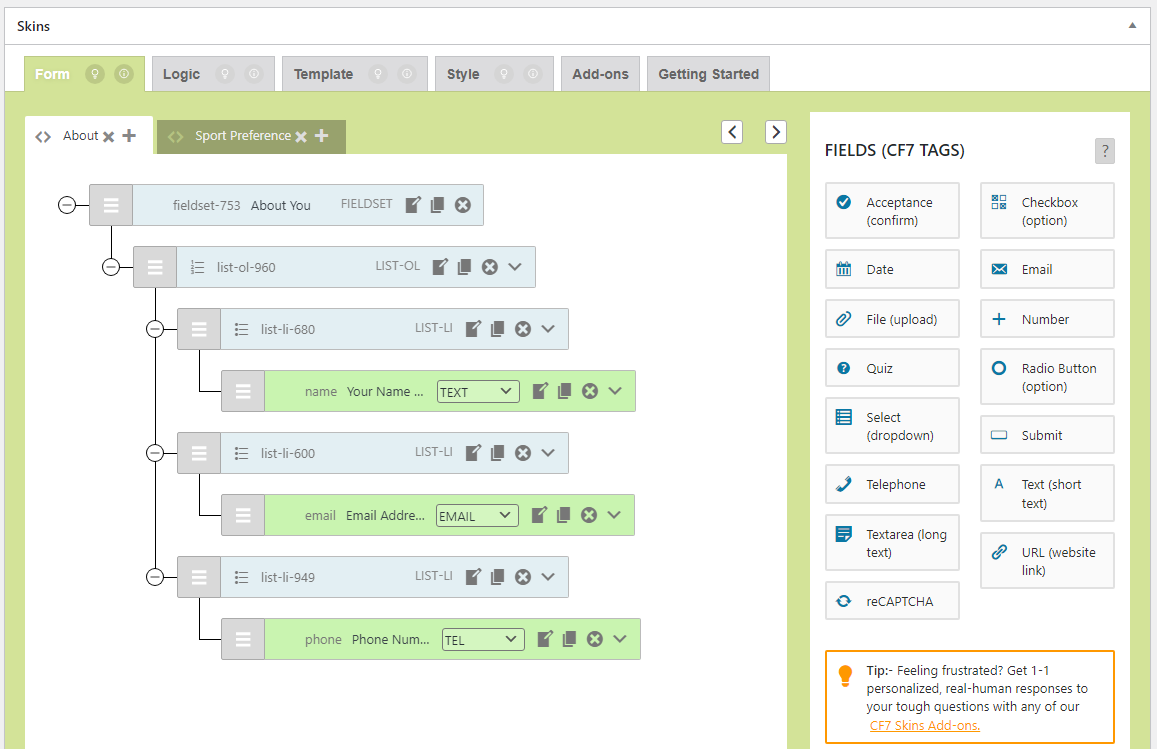
Build multi-page forms right from CF7 Skins Visual Editor
Multiple pages are the modern way of handling extensive forms. Generally, users are much more comfortable filling forms section by section, instead of going through long forms. The Contact Form 7 plugin does not offer this functionality.
CF7 Skins Multi allows you to easily break your Contact Form 7 forms into multiple pages. Forms can be divided where required, quickly & easily, right from the CF7 Skins Visual Editor.
Options and Customizability
CF7 Skins Multi includes the features you need to make user-friendly multi-page Contact Form 7 forms. It also provides options to add navigation links, progress bar, pagination, start and end buttons, customizable previous and next buttons, and the Thank You page text.
- Tab Titles – with click navigation
- Progress Bar – indicates to users where they are (optional)
- Navigation Buttons – Previous & Next buttons on each page (optional)
- Pagination – current page / total pages (optional)
- Start & End Tabs – additional navigation buttons (optional)
- Thank You Tab – extra page displayed only after completed form submission (optional)
- Design Matches CF7 Skins Style – styling of multi-form elements matches selected CF7 Skins Style
You can choose how you want each multi-page form to operate by simply selecting from the range of options.
CF7 Skins Multi includes the features you need to make user friendly multi-page Contact Form 7 forms.
| Personal 1 site / year | Business 3 3 sites / year | Business 5 5 sites / year | Unlimited sites / year |
|
|---|---|---|---|---|
CF7 Skins MultiMulti-step / Multi-part Forms |
||||
| Initial Purchase | $49.00 | $79.00 | $99.00 | $129.00 |
| Renewal | $39.20 | $63.20 | $79.20 | $103.20 |
Annual renewal required for ongoing access to updates & support |
||||
User-friendly CF7 Skins Visual Editor
Use the CF7 Skins Visual Editor to easily add multiple pages to your Contact Form 7 forms. You can also rename the added tabs, reorder or delete them.

Consistent with the CF7 Skins style
Your selected CF7 Skins style is automatically applied over all CF7 Skins Multi elements in your form.

Demo Form
You can help us improve CF7 Skins Multi by completing this form. This will show you a CF7 Skins Multi form in action. In addition, as a thank-you, we’ll send you a Discount Code to use with your next purchase from CF7 Skins.
This form is made with CF7 Skins + CF7 Skins Extra + CF7 Skins Styles + CF7 Skins Multi + CF7 Skins Logic
Note
- Requires at least Contact Form 7 Skins v2.0
Other pre-sale questions
Feel free to contact us if you have other unanswered questions.