
CF7 Skins Logic

Conditional Logic for Contact Form 7
Conditional Logic with CF7 Skins Visual Editor
Conditional Logic is a way to apply rules to your Contact Form 7 form based on the user input and behavior. This allows you to control what information users are asked to provide and tailor the form specifically to their needs. The Contact Form 7 plugin does not currently offer this functionality. It can be done via custom programming but you need to be rather skilled at WordPress development using PHP and/or jQuery.
CF7 Skins Logic allows you to add conditional logic to Contact Form 7 forms. Conditional logic can easily be added to any form field based on the input from any other field, right from the CF7 Skins Visual Editor.

Adding Conditional Logic with Intuitive Visual Editor
Using CF7 Skins Logic, you can dynamically show or hide the displayed form fields based on user inputs in other fields. It also provides:
1. An interactive and easy-to-use Logic tab.
2. Improved aesthetic value with a better-looking UI.
3. An efficient underlying technology with the upgrade from jQuery to React.
Options
- Drag and drop Fields and Tabs (for Multi-page forms) to add conditions.
- Show or Hide selected fields or tabs.
- Field, User or Post characteristics can be used as operands.
- Build logic statement based on conditional operators or content of a field.
- Choose whether All or Any one of the conditions needs to be fulfilled for multiple logical statements.
- Duplicate a logic item or statement.
- Use Logic Data to replicate the conditional logic across multiple forms.
| Personal 1 site / year | Business 3 3 sites / year | Business 5 5 sites / year | Unlimited sites / year |
|
|---|---|---|---|---|
CF7 Skins LogicConditional logic on form fields |
||||
| Initial Purchase | $59.00 | $89.00 | $119.00 | $149.00 |
| Renewal | $47.20 | $71.20 | $95.20 | $119.20 |
Annual renewal required for ongoing access to updates & support |
||||
Easily add conditional logic to forms
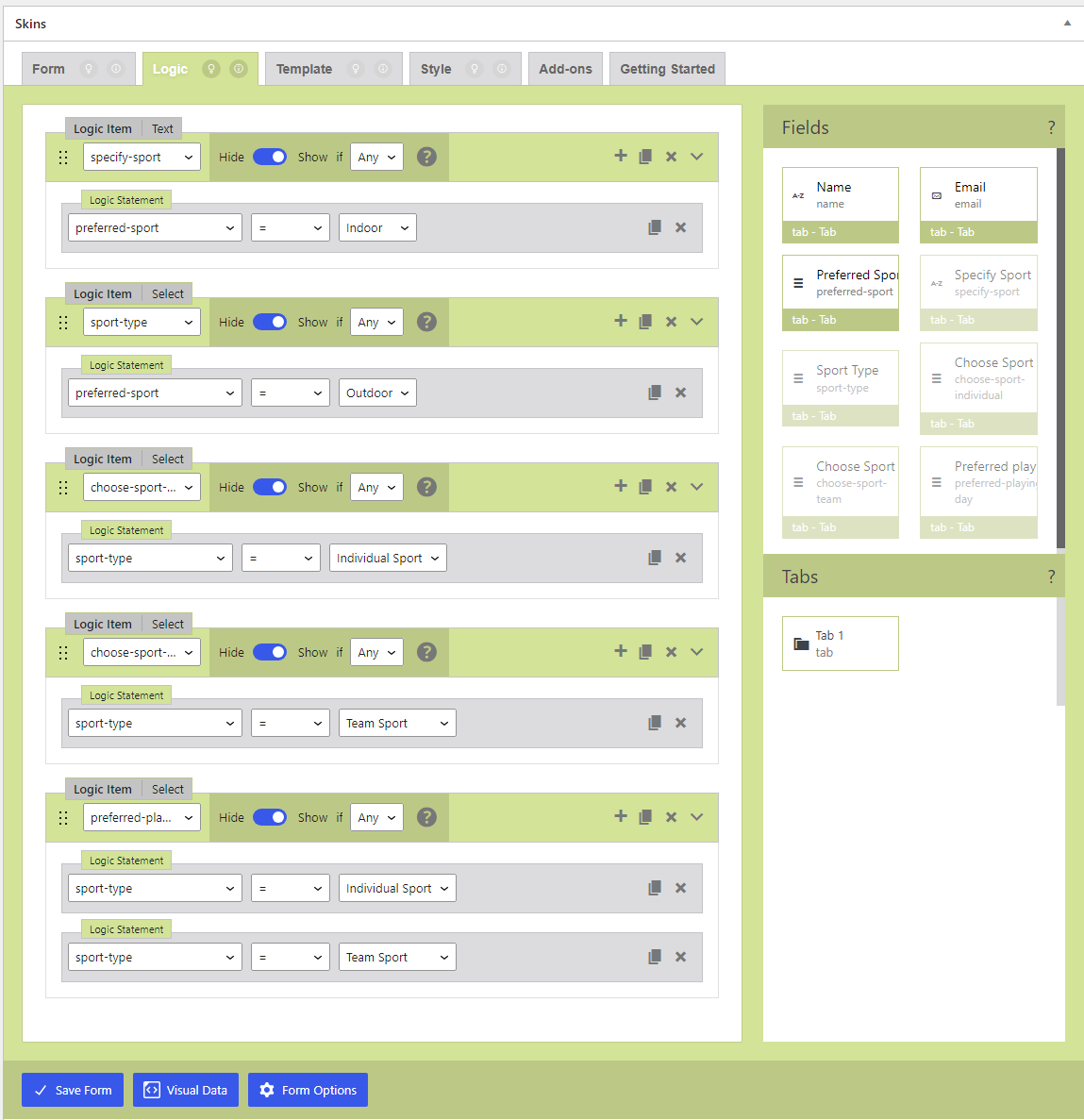
CF7 Skins Logic adds an extra tab where you can configure each Contact Form 7 form to show or hide fields based on user selections.
Drag-and-drop feature for a better user experience
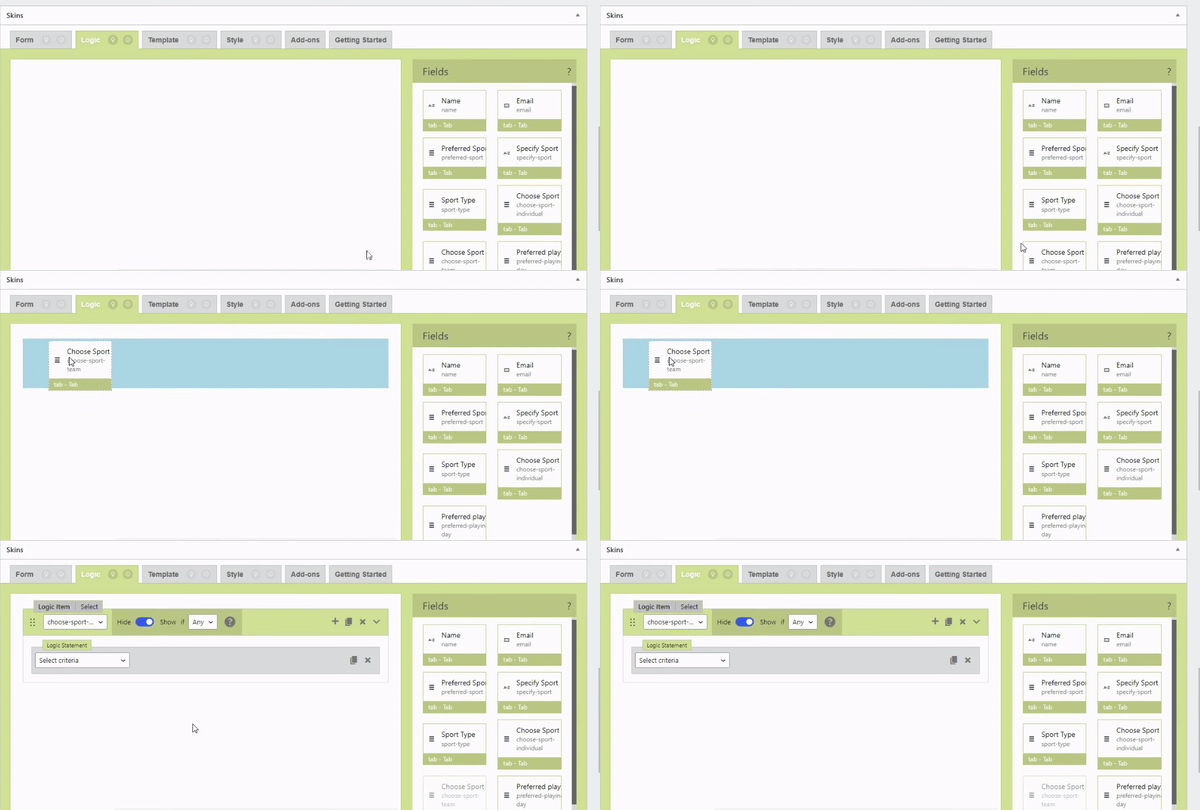
You can drag a field and drop it in the Logic tab to create a new Logic Item.
Duplicate items to speed up the form creation
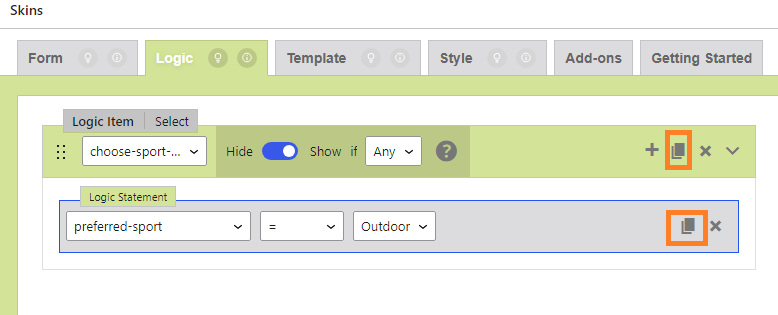
You can use the Duplicate icon to create a new copy of a logic item and make minor adjustments to the new item. This way, you can speed up form creation since you don’t have to create an entirely new item.
Demo Form
You can help us improve CF7 Skins Logic by completing this form. This will show you a CF7 Skins Logic form in action. In addition, as a thank-you, we’ll send you a Discount Code to use with your next purchase from CF7 Skins.
This form is made with CF7 Skins + CF7 Skins Pro + CF7 Skins Ready + CF7 Skins Multi + CF7 Skins Logic
Find more examples of CF7 Skins Logic in use at CF7 Skins Logic Demo Forms.
Notes
- [UPDATE after the CF7 Skins version is finalized]Requires at least CF7 Skins v2.0
- Conditional Logic can also be added within CF7 Skins Multi forms
Other pre-sale questions
Feel free to contact us if you have other unanswered questions.